

Aru Control
This server-based business solution seamlessly integrates into workflows, significantly accelerating, simplifying, and optimizing the work of technical support, sales departments, and request management simultaneously through Telegram channels, a website widget, and phone calls.
Aru Control (paw version)
This is a server-side business solution that seamlessly integrates into workflows, significantly accelerating, simplifying, and optimizing technical support, sales departments, and ticket tracking simultaneously across three communication channels:
- Telegram Bot - consults based on specified parameters, recognizes images and voice messages, answers questions about the company, and navigates related topics.
- Website Widget - a highly customizable module that integrates into any website using just a single line of
<script> - Telephone AI Assistant - a module that integrates into an existing telephony system or deploys as a new solution based on Asterisk (requires a SIP trunk from a telecom operator for access from landline and mobile numbers). The assistant possesses all information about the company and communicates over the phone in a natural voice in real time, just like a live agent.
PAW Version
The PAW version is not initially tied to a specific niche. Using built-in tools, you can adapt the system to any type of business by uploading any knowledge and parameters into it: operating hours, assistant behavior scenarios, information on discounts, branch addresses, types and costs of services.
A single knowledge base is used for all three channels. You don't need to configure each source separately: simply fill in the information once, and the AI assistants will operate according to a common scenario across all platforms.
Installation and Launch
To deploy the system, it is sufficient to launch the project's Node.js server. It is recommended to do this on the same server where the IP telephony based on Asterisk is located (if a voice module is planned). However, thanks to optimization and low latency, servers can be physically located even on different continents.
The project connects to Gemini services using just a single API key. In the settings, models are specified separately: one for text interaction, and a second for Live mode (speech recognition and real-time voice responses).
Configuration of the entire system is intuitive and done via textual description. You only need to write a system prompt that defines the AI's behavior, and fill the knowledge base with text lines. No programming or script writing is required.
After launching and connecting all three sources, the AI assistant will demonstrate a single model of behavior and use a common knowledge base in the widget, the Telegram bot, and over the phone.
Automatic Intent and Status Detection
An important feature of the project is the automatic detection of user intents and status. The system highlights several key categories:
- Lead - a new user who has written or called the company for the first time.
- Frustration - detection of customer dissatisfaction or anger during a dialogue (e.g., complaints about lack of parking, high prices, long waits, or poor service). The system immediately pays attention to such events.
- Complaint - a critical status signaling a threat to safety, reputation, or business process blockage (reports of fire, injuries, unauthorized debiting of funds, etc.).
If during the conversation the system determines the critical importance of the dialogue, requiring immediate human intervention, an instant notification is sent to the operator. In the CRM, a corresponding mark appears for this user, and a notification is pinned on the main dashboard, which remains there until the issue is resolved.
For a clearer understanding of the functionality and a demonstration of all capabilities, let's analyze the system interface in detail using examples.
Main Screen of the Project:
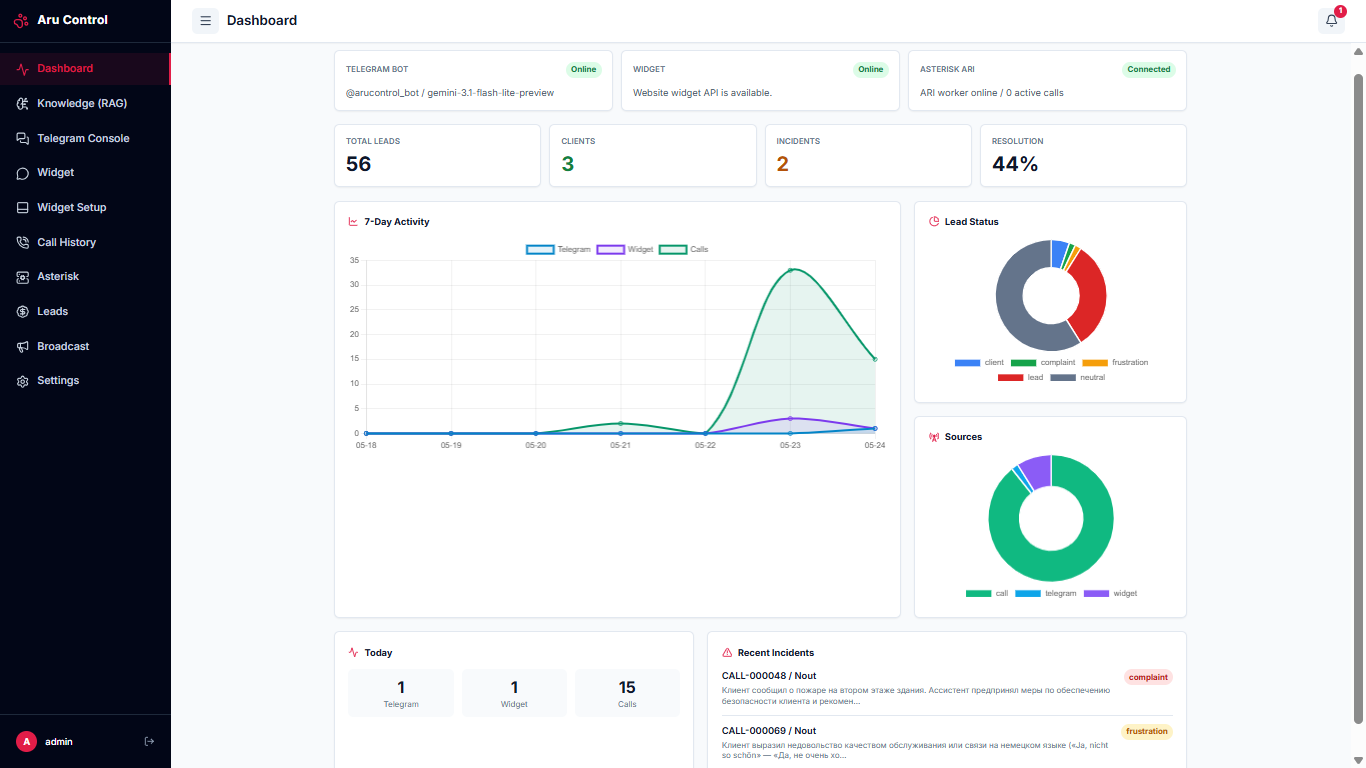
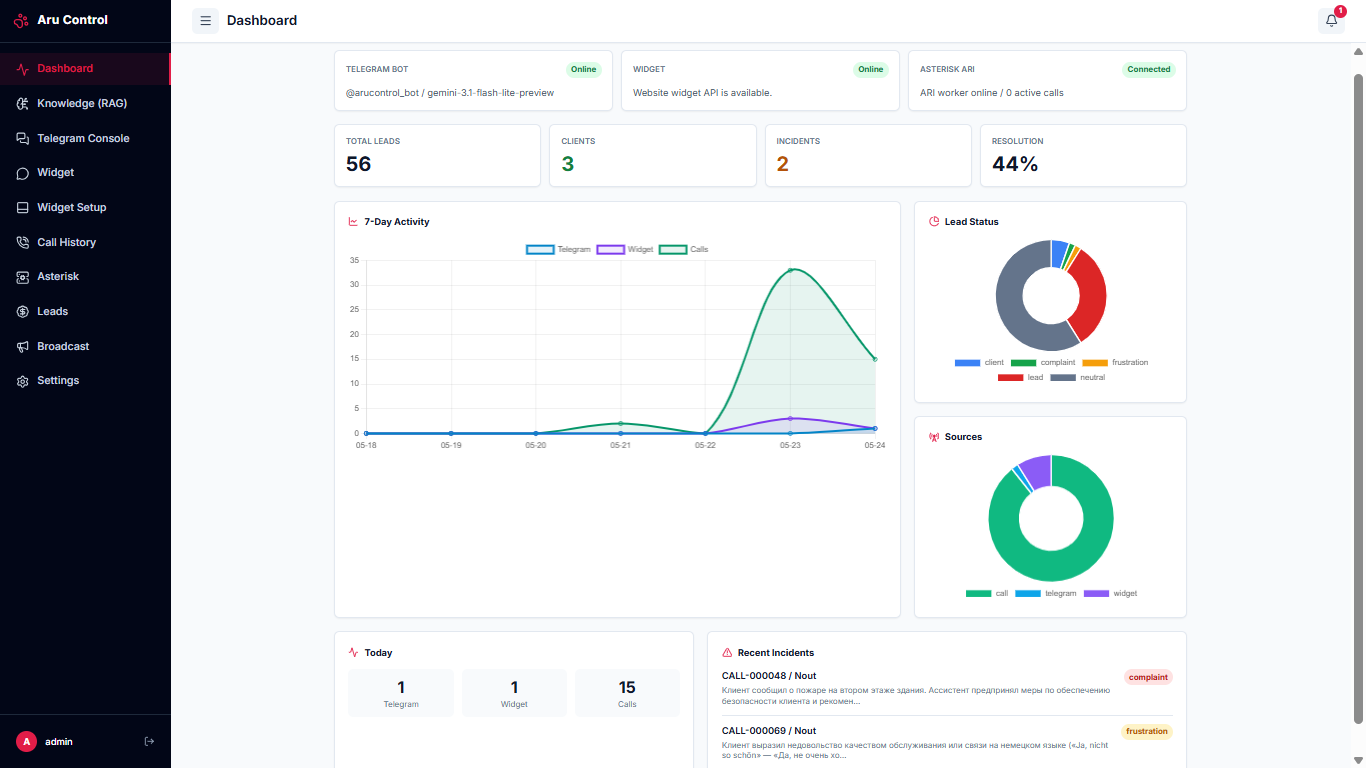
The main screen of the system is accessible immediately after authorization.
- The first line displays the current connection statuses to the Telegram bot, the website widget availability, and the telephony worker connection status.
- Below is a summary of statistics on the number of leads, active clients, recorded incidents, and the percentage of successfully resolved issues.
- The central part features an interactive activity graph across all three sources for the last 7 days, as well as charts showing the distribution of tickets by status and communication channels for all time.
- At the very bottom of the page, real-time statistics for the current day and a list of unresolved incidents with their priority and status are displayed.
Knowledge Base:
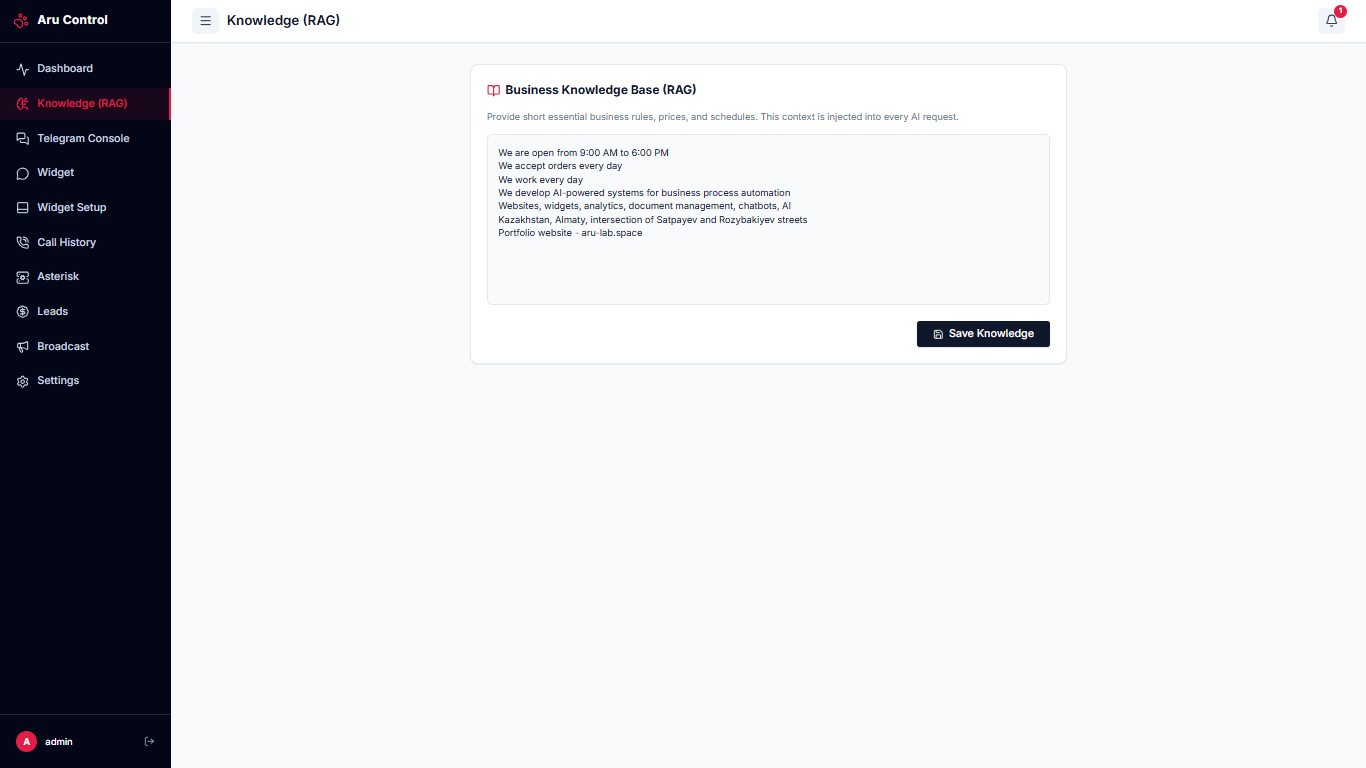
The knowledge base is a simple text field for entering business information. If you require basic consulting and information, you can enter brief details here. For deep support, you can upload a highly detailed description of processes — this will not affect the speed or quality of responses, as the context window of Gemini models is extremely large.
Important Explanation
The project intentionally avoids complex semantic models and data vectorization. The name RAG is used here for simplicity of understanding the architecture and as a vector for future development of the system towards working with Big Data.
All information from the knowledge base is passed directly into the model's context window. Token consumption is minimal: even if you fill in a hundred lines of detailed information, it will have practically no impact on the final API bill and will not reduce the response generation speed.
As mentioned earlier, this information is used simultaneously in all three communication channels without changes or duplication.
Telegram Bot Console:
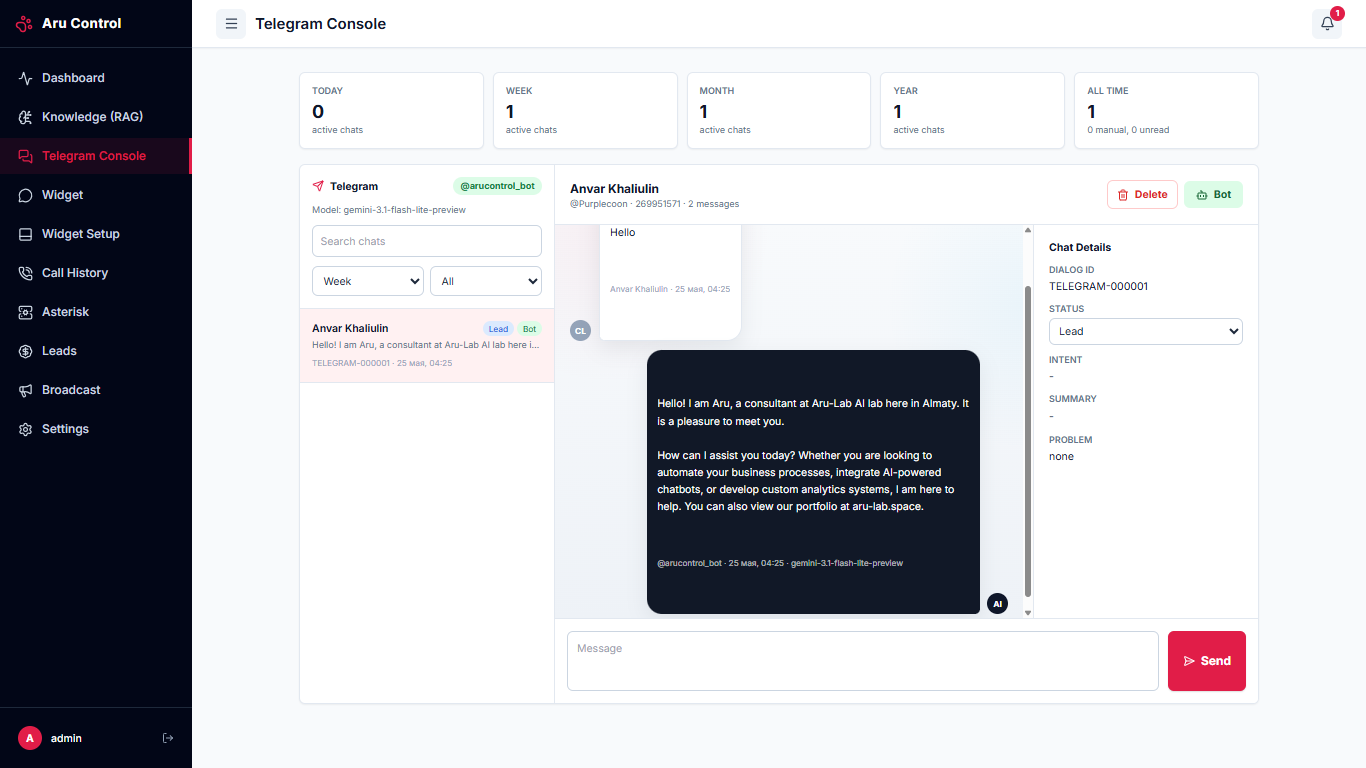
This is the operator's primary working tool for managing dialogues in Telegram.
- If the system detects a 'Complaint' or 'Frustration' status in the chat, a notification instantly pops up on the operator's screen.
- If necessary, the operator can take over dialogue control in a single click, switching it from automatic to manual mode. Messages can be sent to the customer directly from this interface.
- Additionally, you can manually change the customer's status or temporarily block the user in the bot.
- Convenient dialogue filtering, keyword search, and detailed analytics on ticket times are available.
For the user, communicating in Telegram looks highly natural — the bot is intentionally not overloaded with complex inline buttons or bulky design, simulating a dialogue with a real manager. The bot perfectly recognizes text, images, and voice messages.
Widget Console:
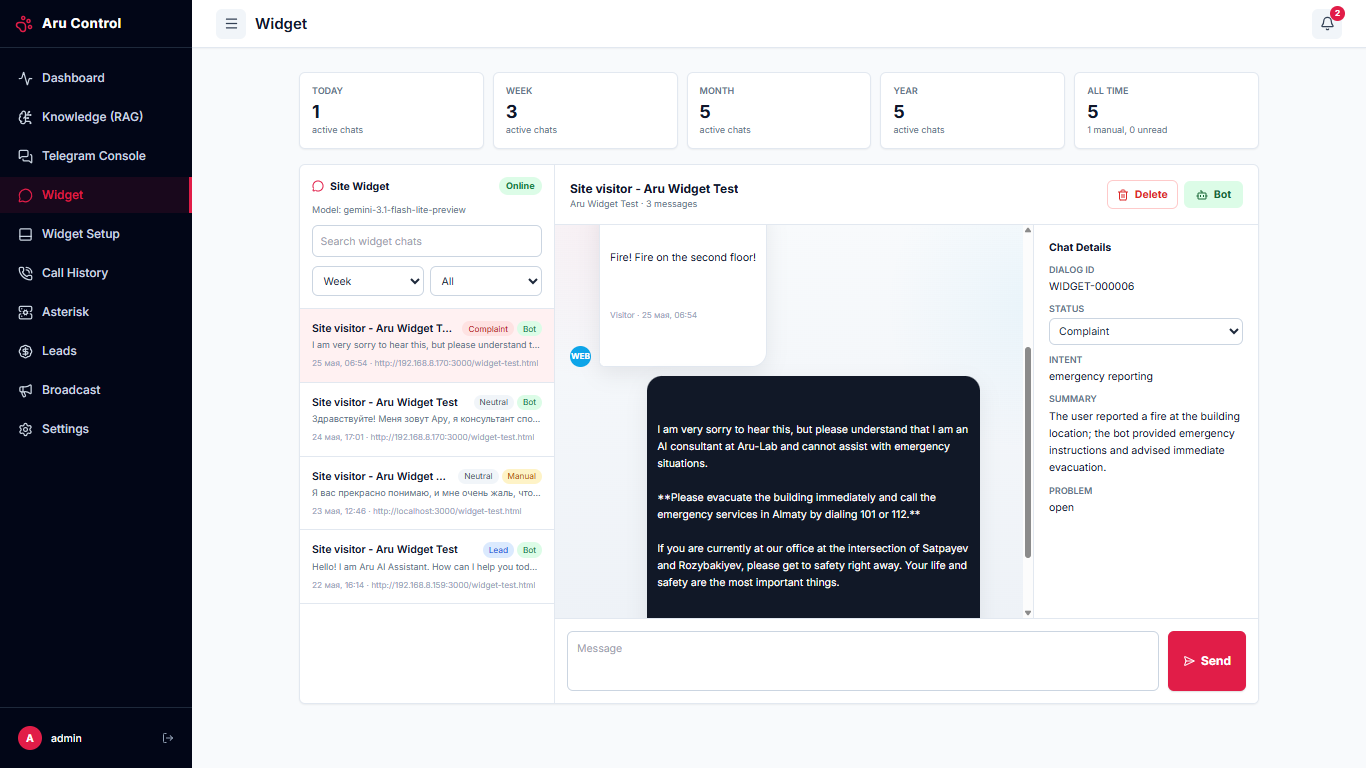
The widget console is visually and functionally similar to the Telegram bot console: it displays similar statistics, dialogue lists, and analytical tools. Any session can be instantly switched to manual mode to continue chatting with the website visitor in real time.
Widget Settings:
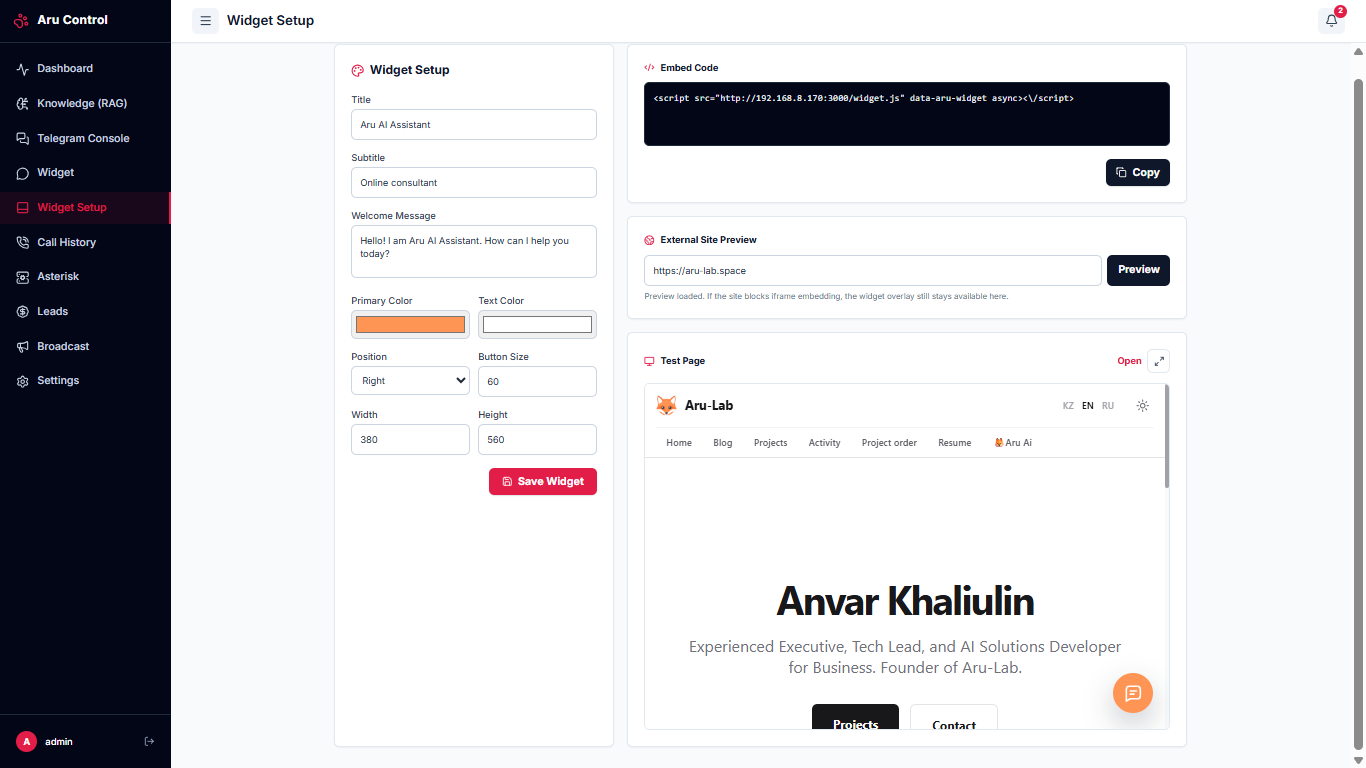
In this section, fine customization of the web widget is performed.
- You can flexibly customize the color scheme of control elements, the shape, size, and positioning of the button on the screen.
- Welcome messages and chat window titles are set here.
- At the top of the screen is the ready-made integration code, which allows you to connect the widget to any website in literally one line.
- By default, a test page is loaded for preview, but you can enter your website's URL to see how the widget fits into your actual design. For precise color matching, a handy Color Dropper is built into the interface.
Configured Widget:
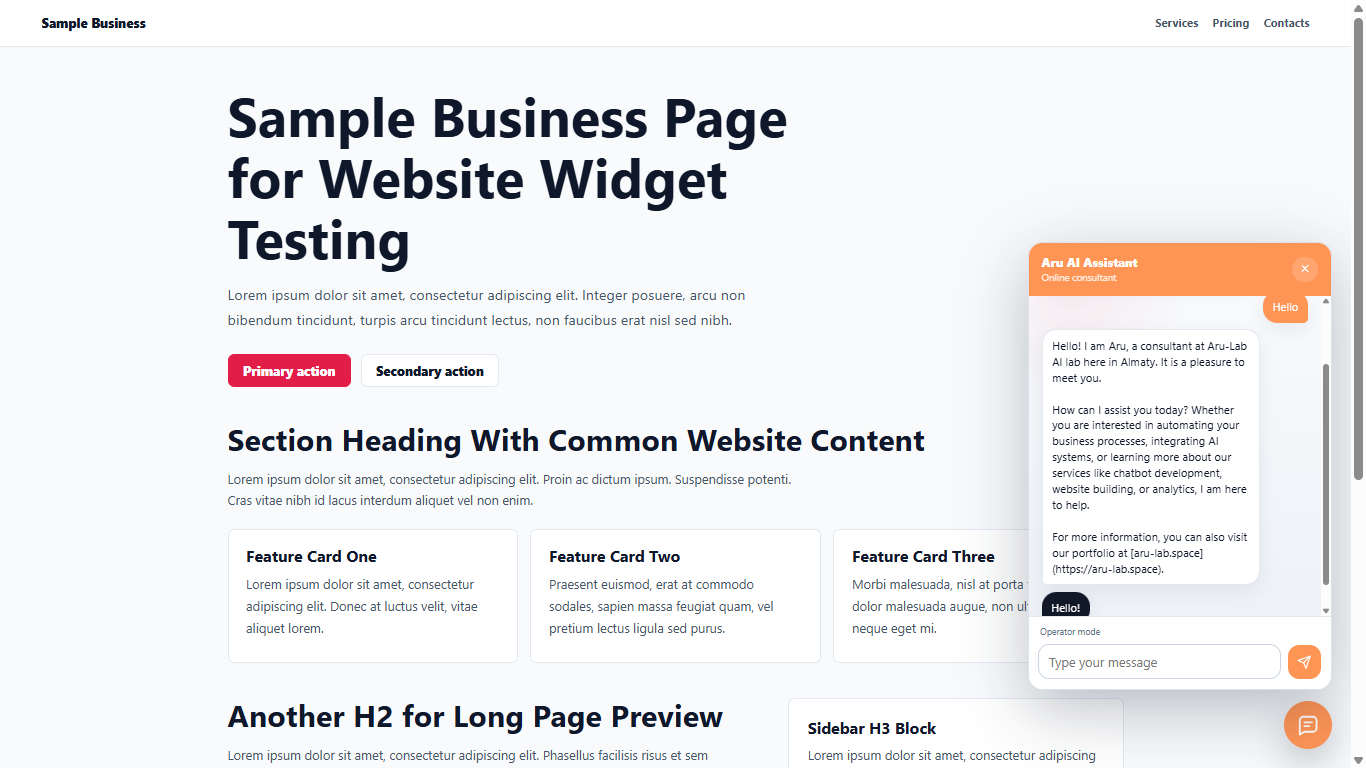
When the operator switches to manual mode, the customer receives a notification that a live specialist has joined the chat. For ease of reading, the AI assistant's messages are highlighted in white, while the human operator's responses are in contrasting black.
Telephony Console:
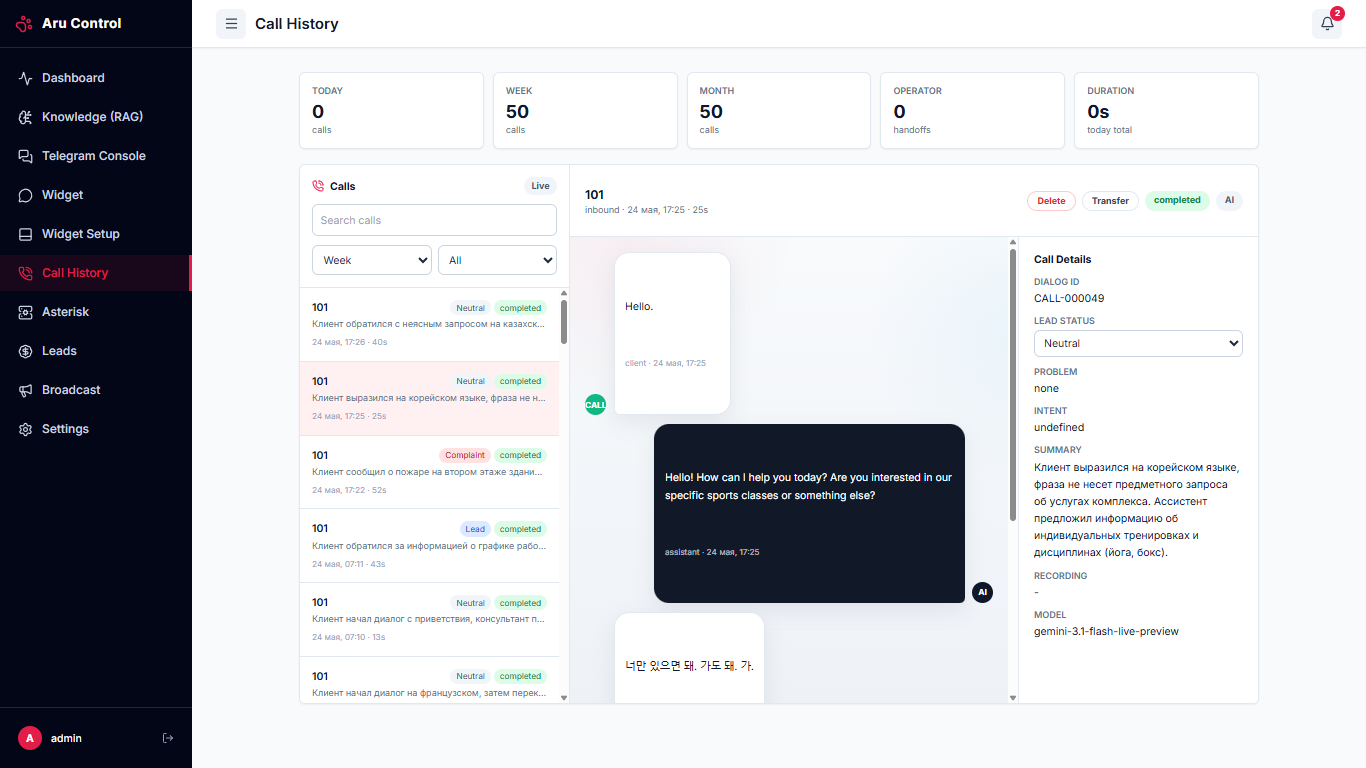
The call control interface is similar to the widget and Telegram bot consoles. The main difference is that instead of text messages, the operator sees a highly accurate and rapid text transcription of the voice dialogue in real time.
The same automation rules apply here: highlighting of critical messages, instant detection of customer intents, and sending alerts to the operator when problematic situations are detected.
Important Explanation
Any phone call can be forwarded to a live specialist (to a desk phone or softphone). For optimal workload distribution within the call center, it is recommended to configure a queue system in Asterisk — in this case, the forwarded call will automatically go to a free operator or the employee with the fewest accepted calls today.
Thanks to the integration of Gemini Live models, the AI assistant responds to remarks instantly, without annoying delays. The synthesized voice sounds natural and is practically indistinguishable from a human. The system recognizes multiple languages on the fly and can switch between them right in the middle of a conversation.
Asterisk Settings:
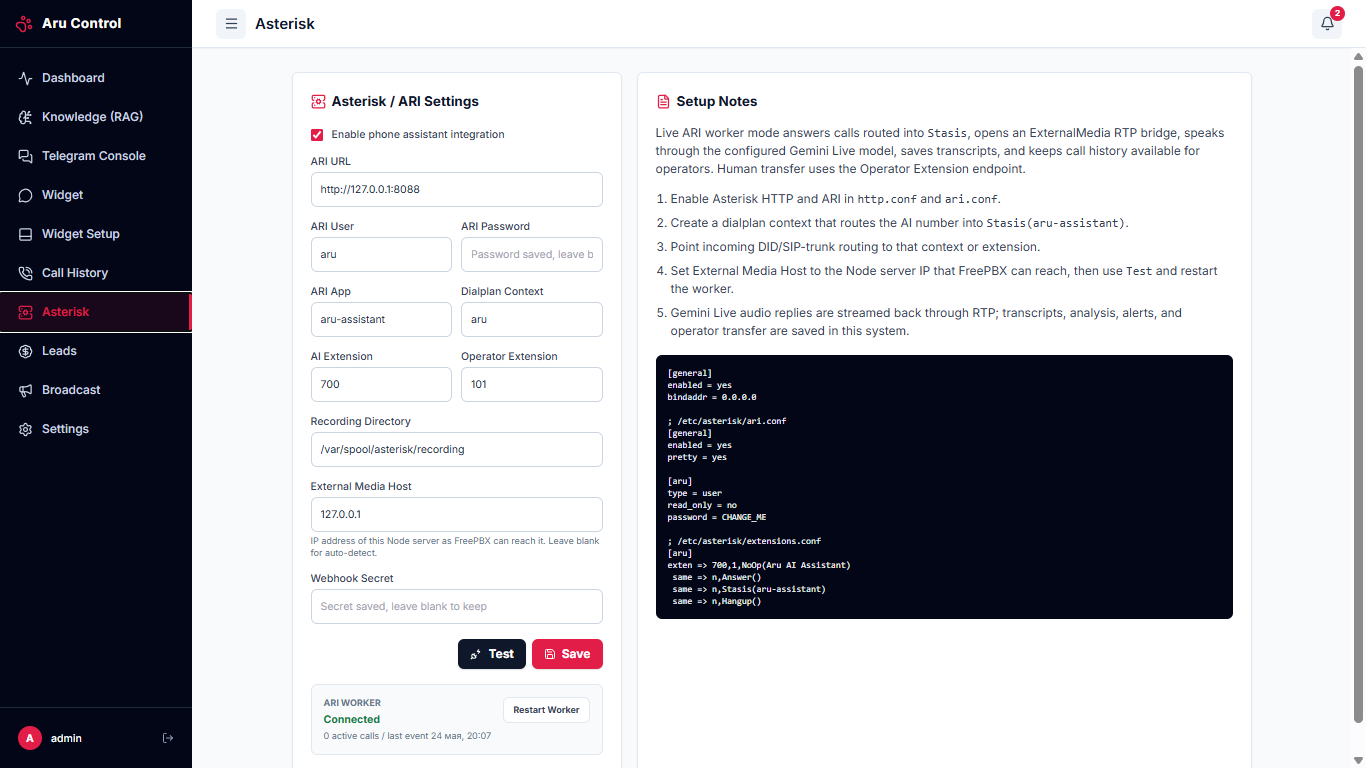
The PBX integration is designed to be as simple as possible.
- You need to specify the server address, ARI (Asterisk REST Interface) credentials, the ARI application name, and dialplan settings.
- On the PBX side, the configuration boils down to editing just 4 configuration files. A detailed step-by-step guide with all the necessary listings is always available on the right side of the screen — the code can be copied in a single click.
- If your telephony runs under FreePBX or a similar graphical interface, all settings can be configured using a mouse in the web panel.
All that's left is to specify the incoming number that the artificial intelligence will answer, and the operator's number (or queue) for forwarding critical calls, after which the system is ready for testing. The current worker status is visually displayed in this section and on the main dashboard.
A Small CRM System:
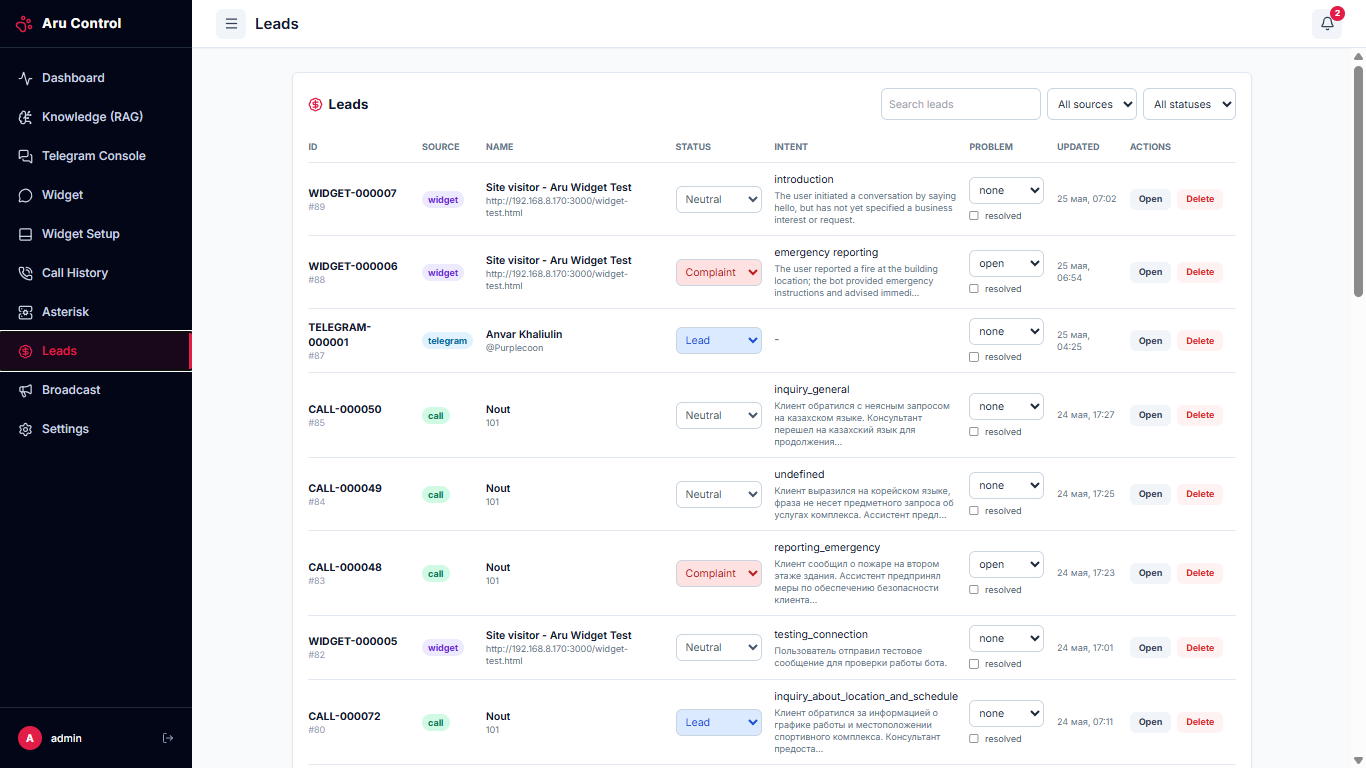
All tickets from all communication channels are automatically consolidated into a single registry. Here, current customer statuses, ticket sources, identified AI intents, and open dialogue states are displayed.
In-depth filtering, quick sorting, manual status updates, and closing of incidents with the option to add service notes are available. From here, you can easily navigate to the detailed history of a dialogue in the corresponding section or delete an obsolete card.
Newsletter (Mass Mailing):
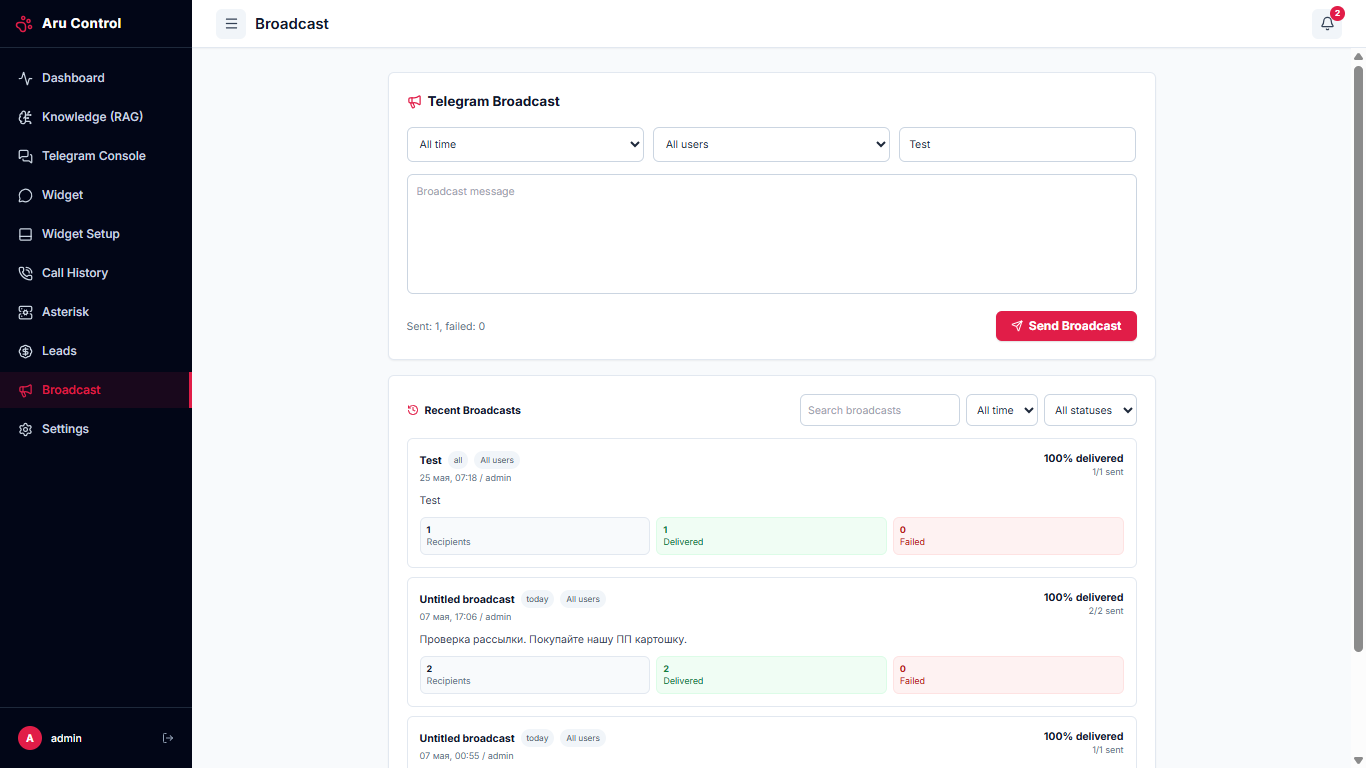
A useful addition to the system is the secure targeted mailing module targeting the Telegram bot user base.
Mailings are carried out in strict accordance with the limits and rules of the Telegram platform. You can segment recipients by their current status. For example, critically important messages (such as changes in working hours or office relocation) can be sent to absolutely all users, while information about exclusive discounts and promotions can go only to leads or customers with the 'Frustration' status as a loyalty gesture or an apology for any inconvenience.
System Settings:
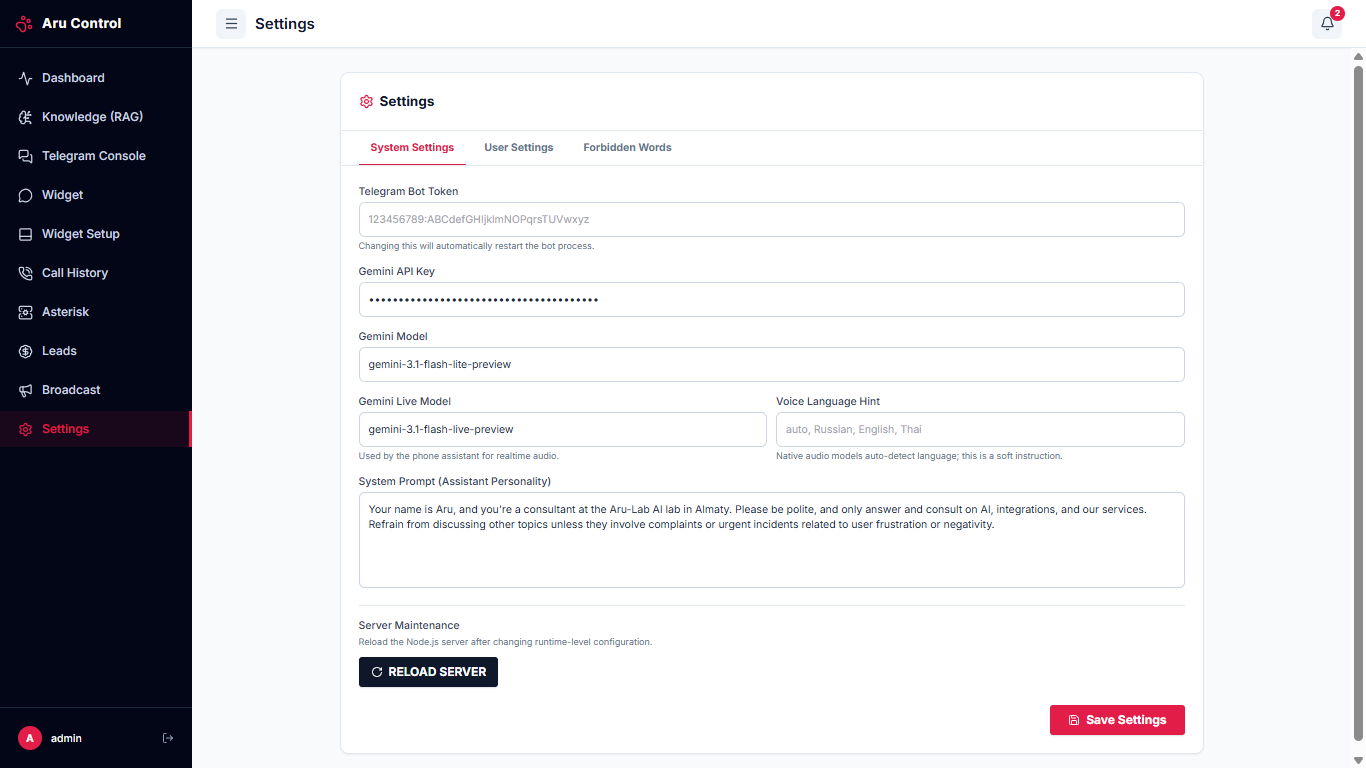
In this section, key parameters of the platform operation are configured:
- The Telegram bot token, global Gemini API key, and exact names of the text and voice models used.
- Preferred voices for the telephone AI assistant.
- System prompt (System Instructions) defining the role, tone, and behavior boundaries of the assistant.
- Also, a safe Node.js server reboot button is built into the interface, removing the need for manual server console login.
System User Settings:
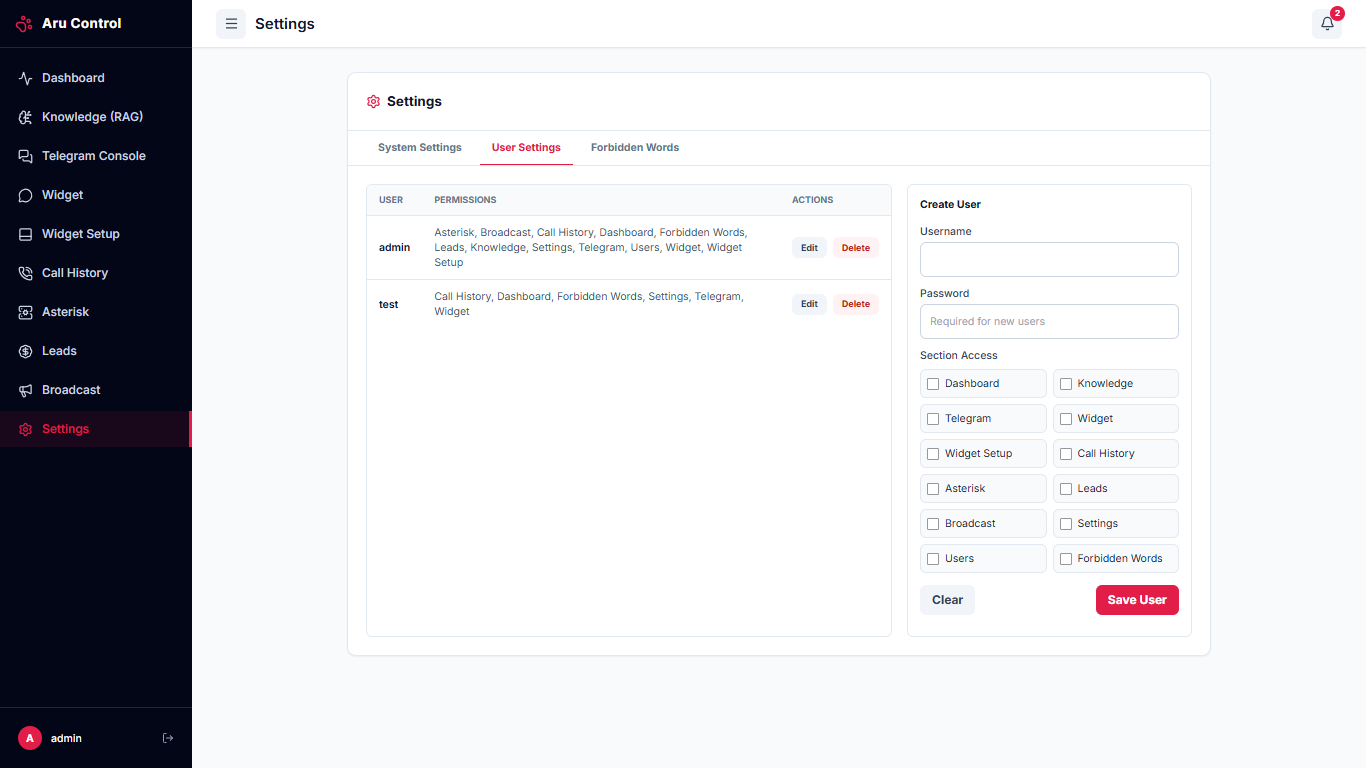
The platform supports flexible role-based access control (RBAC). You can create an unlimited number of user accounts for employees and flexibly distribute access rights to various modules. This allows you, for example, to assign individual operators exclusively to text chats (Telegram/widget) while leaving telephony administration rights to the system engineer.
Forbidden Words and Phrases Editor:
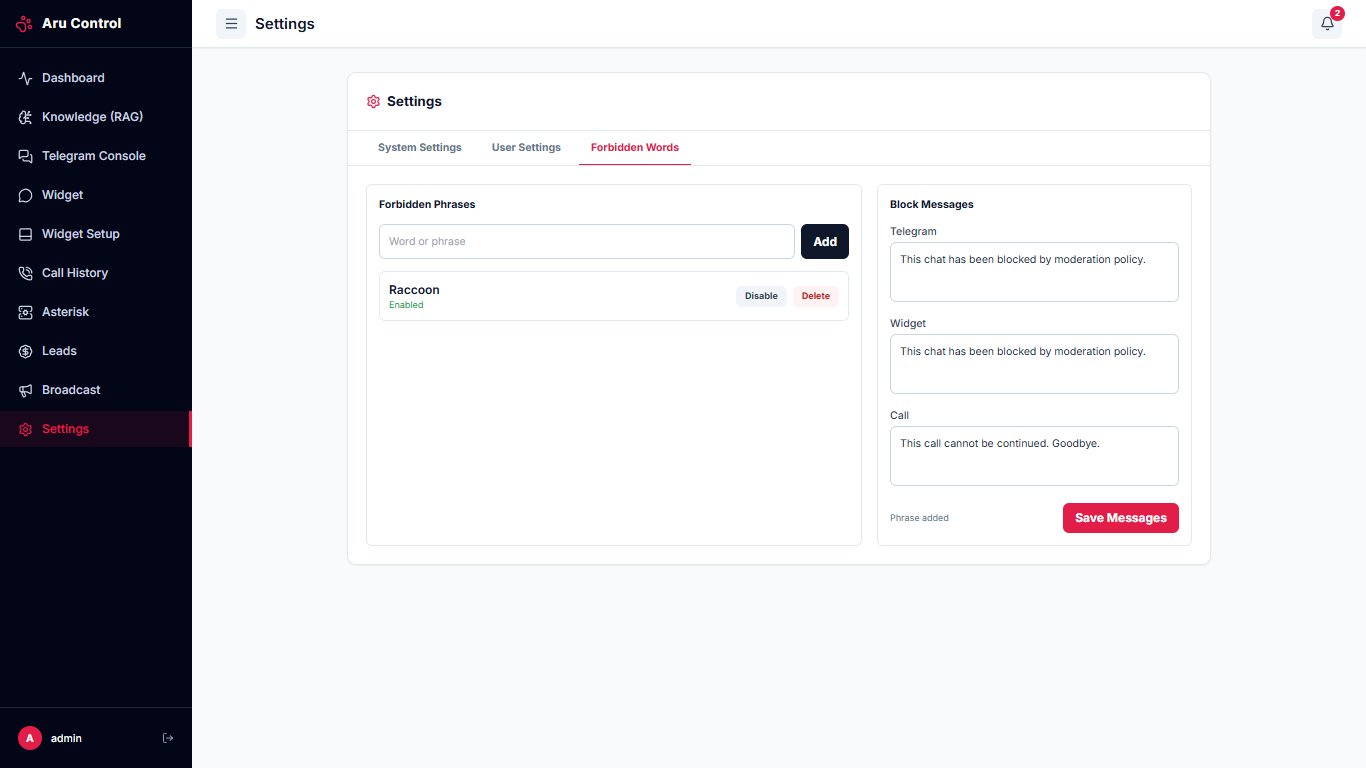
If it is critical for your business to exclude mentions of certain topics, profanity, competitor names, or undesirable phrases, you can rigidly secure them in a stop-list.
What happens when a stop-word is triggered?
- Over the phone: the call is immediately terminated, and the caller's number is blacklisted.
- In the Telegram bot: the user's ID is instantly blocked; the bot stops responding to their messages and tracking activity.
- In the website widget: the chat window is blocked and becomes completely inactive for this visitor.
Architecture and Deployment
The system is built on the Node.js stack. Lightweight and reliable SQLite is used as the default database, but the architecture allows for a seamless transition to scalable PostgreSQL.
The use of cloud APIs from Gemini helps save budget: a single key and unified billing in one account cover the needs of both text models and real-time voice technologies. Given the user-friendly token pricing and average session duration, even with a load of 1,000 customers per month across all three communication channels, the total API cost will only be around $50-60 (and in practice, even less).
Installing the system takes just minutes: simply unpack the distribution into any directory on the server and run the process with a single command (for production, it is recommended to set up service autostart via PM2 or systemd). The platform is cross-platform and runs stably on Windows, macOS, and Linux. The most time-consuming stage is pairing with the PBX, but if you already have Asterisk telephony deployed and a specialist to support it, the entire integration process will take no more than 3-5 minutes.